
KA Panel: the free hosting control panel we built for our own customers
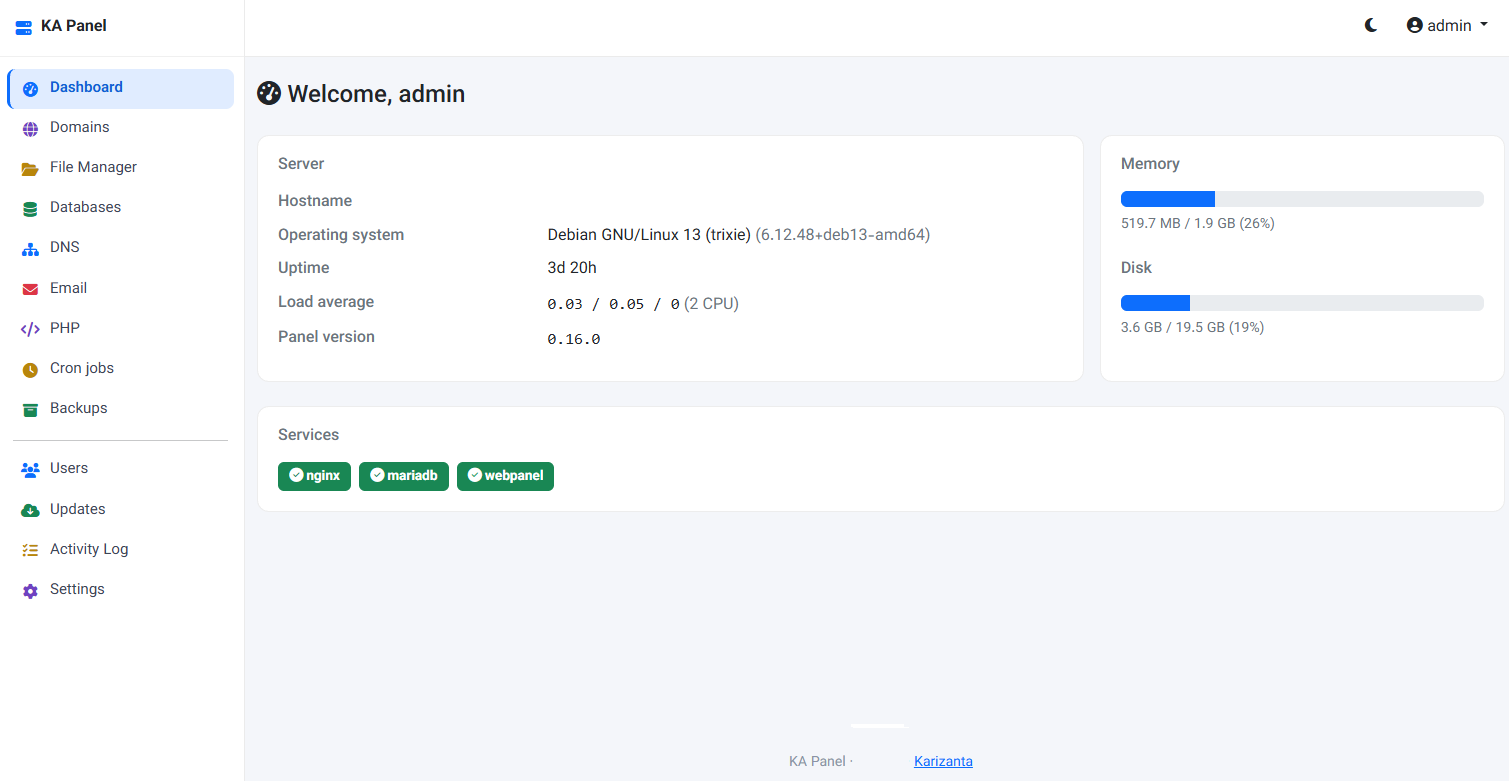
Every server we hand over ends up needing the same things: a few sites on nginx, PHP that can be a different version per site, certificates that renew themselves, a database, somewhere to read the mail, and a backup that runs whether or not anyone remembers. The panels that do this well are licensed per server, per year. The free ones tend to be abandoned, or they want a whole operating system of their own.
So we built our own. KA Panel is Karizanta's hosting control panel, made for the people who run servers with us — and it is free, with no licence key, no per-server fee and nothing to renew. Take a VPS or a dedicated server from us, pick Debian 13 or Ubuntu 24.04 at checkout, and one command later you have a panel:
On a fresh server that takes about seven seconds. You then open https://your-server:2083, create the administrator account, and the setup page closes behind you for good.
If your server is somewhere else, it still runs — we would rather you use it than not.
Everything it does
Websites
Add a domain and the panel writes the nginx server block, creates a system user for the site and a PHP-FPM pool that runs as that user. The www alias is a checkbox. The document root is chosen for you — public_html for the first site, sites/<domain> for later ones — and everything above it, like logs and application storage, stays out of reach of visitors while PHP can still read it.
Your own nginx directives live in a separate include per site. Panel updates never touch that file, so a custom rewrite or a proxy block survives every upgrade.
Suspending a site serves a 503 instead of its files, and resuming puts it back exactly as it was.
PHP, per site
Versions 7.4 through 8.4, installed on demand — pick one on the site's page and the panel fetches it if the server does not have it yet. The PHP page then gives each site its own limits: memory, maximum run time, upload size, whether errors show on the page, and allow_url_fopen. Customers get a lower ceiling than administrators, and only an administrator can change how many PHP workers a site may use, because that is the site's share of the machine.
open_basedir confines a site's PHP to its own home. It is on by default and switchable, because a few applications — OpenCart 4 is the usual one — genuinely cannot run with it. The site still runs as its own user either way.
Certificates
One button gets a Let's Encrypt certificate, and renewal happens without you. Before asking Let's Encrypt for anything, the panel publishes a random token and fetches it through the public hostname: if DNS is wrong you get a clear message instead of a rate-limit ban. Forced HTTPS is a switch, and it stays out of the way of a CDN in front of the site rather than looping.
File manager
Upload, download, edit in the browser, rename, change permissions, create folders, extract an archive, compress a selection. Every operation goes through a jail, so a path or an archive entry that tries to climb out of the account's home is refused rather than followed — a zip with ../../etc/cron.d/x inside does nothing at all.
Databases
MariaDB is installed the first time someone asks for a database. Databases and users are created with the account's own prefix, as on cPanel, and a generated password is shown exactly once. Grants are per database, and an account can only ever see its own.
Postfix, Dovecot and rspamd, all from Debian's own packages, set up by one button. Then: mailboxes with a size limit and a usage bar, forwarders to one or several addresses, and a catch-all for a whole domain. Roundcube webmail runs on port 2096 with the panel's certificate.
Mail is stored inside the owning account's home and delivered with that account's uid, so it counts towards their disk use, lands in their backups, and is unreadable to every other customer on the machine.
Deliverability is mostly DNS, so the panel checks it for you: MX, SPF, DKIM and DMARC, compared against what public DNS actually answers, each marked correct, different or missing. If the server also hosts the domain's DNS, one button adds what is missing without overwriting records the owner set deliberately. Two things it cannot do for you: the PTR record of your IP, which only your provider can set, and outbound port 25, which many providers block.
Mail a website sends through PHP's mail() is deliberately not DKIM-signed. Otherwise any account on the server could send as another customer's domain and have the server vouch for it. Applications that send over SMTP with a mailbox's own credentials are signed — and an authenticated user can only send as their own address.
A domain whose mail lives at Google or Microsoft is marked as such, so the site's own contact form reaches the real mailbox instead of a local one nobody reads.
DNS hosting
Optional, and authoritative only — never a resolver, because an open resolver on a hosting box is someone else's DDoS amplifier. Turn it on and PowerDNS is installed, a zone is created for every existing site with sensible defaults, and the panel tells you which name servers to set at the registrar and whether delegation has actually happened yet. The zone editor covers A, AAAA, CNAME, MX, TXT, SRV, CAA and NS, and it refuses the combinations DNS does not allow rather than letting you find out later.
Backups
Files and databases, on demand or on a daily schedule with a retention count, and a restore that puts files back and replaces the databases you pick.
A backup on the same disk as the site is not a backup of the disk, so each finished archive can also be copied off the server: into a Google account you connect from the panel, or into any S3-compatible bucket — Amazon, Backblaze, Wasabi, MinIO, your provider's. Both at once is fine. The Google connection uses your own OAuth client and asks for the narrow drive.file scope, so the panel can only ever see the files it put there itself; the bucket is listed once before anything is saved, so wrong keys are caught while you are looking at the screen. Deleting a backup deletes its copy too, and the local archive stays the one a restore reads — restoring never depends on the internet.
Cron jobs
A schedule, a command, an optional note, and a pause switch. Jobs run as the account's own user, from a root-owned file the customer cannot edit, and a command that tries to span two lines is refused — that is how you would otherwise smuggle in a line that runs as root. Common schedules are one dropdown away.
Disk quotas
A limit per account, enforced by the kernel rather than remembered by the panel: one button adds user quotas to the filesystem the accounts live on, and from then on a write past the limit fails the way running out of disk always has. Usage is read from the filesystem, so the number on the page is the number that will be enforced, and showing it costs nothing even with a million files. One account can no longer fill the disk for everybody.
Firewall
The panel manages one nftables table of its own — your provider's rules, fail2ban and docker keep theirs. It starts from the ports this server actually serves and you edit the list: a port, a protocol, and optionally the addresses it is open to.
Applying rules is the one thing in a panel that can cut the wire it is being configured over, so a new ruleset runs on trial for ninety seconds. Confirm it and it is written where the system loads it at boot; say nothing — because the page stopped answering — and it removes itself and the server goes back to how you could reach it before. A ruleset that does not open SSH or the panel's own port is refused outright.
Two-step sign-in
An authenticator code as well as a password, per user, with ten single-use recovery codes shown once. A correct password alone earns only the code page; the session starts after the code. A code that has been used cannot be replayed inside its own thirty seconds, turning it on signs out sessions that were opened with a password alone, and turning it off costs the password again. An administrator can only switch it off for someone locked out — never on, and never to see a secret.
Node.js and Python applications
A site can run your own program instead of PHP. Pick the runtime, the folder, the command and a memory limit; the panel installs Node.js (Debian's version or 20, 22, 24 from upstream) or Python if the server does not have it, runs the program as the account's own user under systemd, restarts it if it dies, and brings it back after a reboot. nginx still serves the files that exist on disk, so static assets never reach your program, and web sockets pass through. There is a button for npm install and for a virtual environment with pip, which matters because customers have no shell. Its output and the program's own log are on the same page.
phpMyAdmin
Switched on per server from the Databases page, served on port 2098 with the panel's certificate and its own PHP pool. Root logins are refused; customers sign in with the database users they created.
Customers
Add a user with the role Customer and they get a hosting account with its own system user immediately, a password shown once and a forced change at first login. They see only their own sites, files, databases, mail and cron jobs. Suspending them takes the sites offline, stops the cron jobs and blocks mailbox logins while mail still arrives; resuming puts all of it back.
Moving in from cPanel
Point the importer at a cPanel account backup and it brings across the files, the databases and their users, the certificate with its chain completed, and the cron jobs — paused, so you can read them before they run. Paths inside configuration files are rewritten to the new home directory, and the report tells you what it could not do.
Six languages
Persian, English, German, French, Dutch and Arabic. The right-to-left layout was designed as one rather than mirrored from an English theme, and adding a language is adding one translation file — the menu, the page direction and everything else come from the file itself. A language missing a single string fails the build, so half-finished translations never ship.
Three decisions that shaped it
One binary. The panel is a single Go program. No PHP runtime to keep patched, no container to babysit, no dependency tree that breaks on upgrade. Updating is replacing one file and restarting one service, and the sites keep serving through it: nginx, PHP-FPM, MariaDB and the mail services are separate processes the panel configures rather than contains.
Every site is its own user. Not a convention — a boundary. A bug in one customer's code cannot read the next customer's database password, mail or files. Dangerous PHP functions are disabled in every pool, nginx will not follow a symlink a customer does not own, and file operations go through the jail described above.
Updates are signed, and they undo themselves. Every release carries an Ed25519 signature made with a key compiled into both the panel and the installer. A build that key did not sign is refused, whatever server handed it over, so neither the download server nor the network in front of it has to be trusted. The previous binary and a copy of the database are kept, and a version that fails to start three times puts the old one back by itself.
What you need
| Operating system | Debian 13 (trixie) or Ubuntu 24.04 LTS and newer, clean install |
| Architecture | x86_64 or arm64 |
| Memory | 2 GB for websites, 4 GB with email |
| Disk | 20 GB or more |
| Ports | 80, 443, 2083 — plus 25, 465, 587, 993, 995 and 2096 with email |
It refuses to install beside another control panel rather than fighting it over nginx and PHP.
What it does not do
Five things were listed here when this panel was announced: disk quotas that are only a number, no two-factor sign-in, backups that never leave the disk, Debian only, and no firewall. All five are done — they are described above. What is still true:
- Debian and Ubuntu only. Not AlmaLinux, Rocky or anything else with RPM packages.
- One panel, one server. No clustering, no managing a fleet from one screen, no shared storage between nodes.
- No reseller tier. There are administrators and there are customers; there is nothing in between yet.
- No billing integration. Orders in WHMCS or HostBill do not create accounts here by themselves.
- The firewall opens and closes ports. It does not ban an address after failed logins — install fail2ban for that; its rules sit happily beside the panel's.
- Backups are not encrypted. An archive goes to Drive or to your bucket exactly as it sits on disk, so whoever can read it can read the sites and databases in it.
Getting it
A clean Debian 13 or Ubuntu 24.04 server, root access, and the one line at the top. Our servers come with Debian 13 as an install option in Coventry, the Netherlands and Stockholm, on the network described on our data centres page, and a domain registered with us points at the panel in a couple of clicks.
The documentation page covers installing, your first site, email and the DNS records that decide whether it arrives, backups, and what to do when something goes wrong.
It is free to use and comes with no support contract — though if the server is ours, the people who wrote the panel are the people who answer your ticket.
Related reading

Shared vCPU, dedicated vCPU or a dedicated server: the three-rung guide
Most 'VPS vs dedicated server' guides skip the middle. Karizanta sells three rungs, not two: shared-vCPU VPS, dedicated-vCPU VPS, and a physical dedicated server. This guide walks all three in order and shows where each jump is actually worth paying for.
Read more →
How to Choose the Right VPS Plan for Your Website
Choosing a VPS plan is about matching specifications to your actual workload, not picking the biggest number on a pricing grid. This guide walks through RAM, vCPU, storage, bandwidth and location with real figures, a sizing table, and the signs that tell you when you have outgrown your plan.
Read more →
How Many MT4 and MT5 Terminals Can One VPS Run? RAM, CPU, and History Bar Traps
Real RAM figures for MT4 on a 2 GB server, the settings that quietly fill it, when the real limit is CPU or error 146, and how to pick a plan.
Read more →